Posts

Why a Balanced PC Build Matters More Than Expensive Parts

When people plan a custom PC build, they often focus on one thing — getting the most expensive CPU or GPU they can afford. But in reality, performance doesn’t come from a single component. It comes from balance. I’ve seen many systems where expensive parts were paired with weak supporting components — and the result was disappointing performance, instability, or both. CPU vs GPU: It’s Not About “Best”, It’s About Fit One of the most common mistakes is overspending on a high-end CPU while pairing it with an average GPU, or the opposite. In gaming systems, for example, GPU matters more. In workloads like development, rendering, or multitasking — CPU plays a bigger role. The key is not to buy the “best” part — but to build a system where components complement each other. Motherboard Quality Matters More Than People Think Not all motherboards are created equal. Power delivery, BIOS support, and overall build quality can directly affect system stability and performa...
What Actually Happens When a Power Supply Fails (And Why It Can Destroy Your System)

Power supply failures are one of the most underestimated causes of hardware issues. Most people expect a system to simply shut down when something goes wrong. In reality, the consequences can be much worse. In several real-world cases I’ve seen, a failing PSU didn’t just stop working — it sent unstable voltage through the system, causing damage to the motherboard, storage devices, and even connected peripherals. Sometimes the system continues to run for a while, which makes the problem harder to diagnose. Why PSU Failures Are Dangerous A modern computer depends on stable voltage across multiple rails. When a power supply starts degrading, it can introduce: Voltage spikes that damage sensitive components Undervoltage leading to instability and crashes Data corruption on SSDs and HDDs Sudden shutdowns during disk operations One of the worst scenarios is when the system appears to “mostly work” while silently corrupting data. By the time the issue becomes obvious, recover...

Monopolization for Android

Last months I work for a new Android app - Monopolization. This is a game similar to the Monopoly board game but with smartphones optimization: less complex, more quick. Go to Play Market to get my Monopoly game .

PassGen Pro 1.0 released

Today I publishedd on Google Play my password generator app. Yes, just another one password generator app. But I think, this app has very good interface for touch devices. Also, as I mentioned in this post , it uses a customized spinner in ActionBar. So, a few words about PassGen Pro. This is an Android app to generate passwords with native, simple, and optimized for mobile touchscreen interface. It supports five modes: Standard alphanumeric Extended with optional special symbols Extra-customized mode with using of provided symbols Special mode to generate easy to remember, but strong passwords And, generate passwords, based on MD5 hash from provided word All modes are customized, you can set password length, using of uppercase symbols, etc. Bulk mode to generate up to thousands of passwords into file also supported. You can download it from Playstore .

GPCL for PHP v. 2.3 commited to GitHub

Today I commit a new version - GPCL for PHP 2.3 - to GitHub. This is not a release, but master brunch for 2.3 stable. You can download sources from here .

Install and configure Exim 4 mail server in Debian 8

One of friends ask me to configure mail in VPS to send messages via web form. He using Wordpress, and can't write custom PHP code to send mail directly via SMTP. Only one way is acceptable here: to use PHP mail() function. Okay, in this case we need a mail server on VPS. I like Exim. To install Exim, run: apt-get install exim4-base After this, run configuration tool: dpkg-reconfigure exim4-config Make selections with using arrow keys, select “Ok” with tab key (note again, server will setup only for send mail): Select: ‘internet site; mail is sent and received directly using SMTP’ Enter FQDN: yourdomain.tld SMTP Listener: enter 127.0.0.1; ::1 Mail destinations - yourdomain.tld, local hostname, localhost.localdomain, localhost Relay Options: Leave blank Follow up Screen to Relay Options: Leave blank DNS Queries: Keep DNS queries to a minimum? select “No” Delivery method: Select “Maildir format in home directory” Choose default unsplit config file by entering “No...

Create custom Spinner on ActionBar

Image
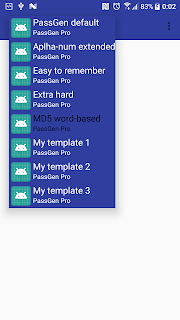
Last days I start working on new Android app, working name is PassGen (Password generator) and plan to place spinner onto the ActionBar. Since API 21 ActionBar replaced to more flexible Toolbar with you can put widgets similar to regular layout. I plan to use spinner but by default it look not fine for me. Starting from modify colors, my mind moving me to add second line and icon to each item. Finally, it looks like this: Almost changes are in XML files. In MainActivity: < android.support.v7.widget.Toolbar android :id= "@+id/toolbar" android :layout_width= "match_parent" android :background= "@color/colorPrimaryDark" android :layout_height= "?attr/actionBarSize" > < Spinner android :id= "@+id/spinner" style= "@style/SpinnerTheme" android :layout_width= "wrap_content" android :layout_height= "wrap_content" android :layout_marginEnd= ...